Tile Game
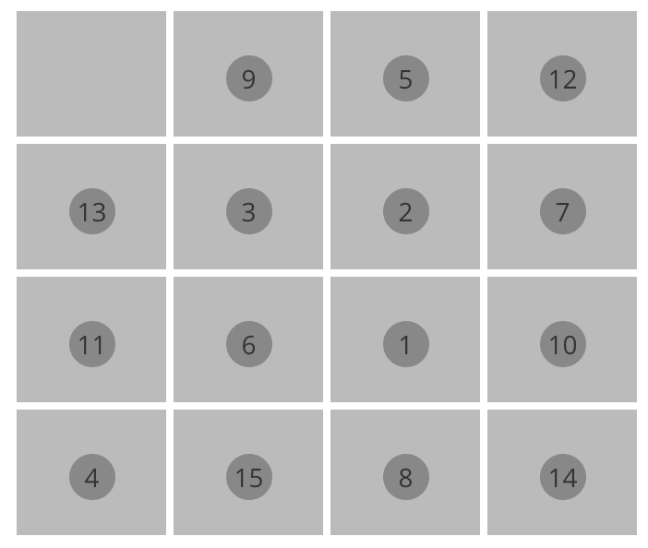
Whenever I learn a new language/framework or library, I start with my favorite tile game app. The game itself is very simple. You will get a 4×4 tile board numbered randomly from 1 to 15 and one of the tiles will be empty. The goal is to sort the tiles in ascending order and keep the empty tile in first position or the last position. You can swap a numbered tile with the empty tile at a time and the tiles can move left or right and top or bottom.
Choosing ES6 vs ES5
I started learning ReactJs using ES5 version of JavaScript and then later I switched to ES6 version of JS. The main reason for this is most of the modern browsers support ES6 and ES6 is very closer to object oriented languages like Java. The syntaxes are easy if you are a Java or C++ developer and much lesser code than ES5. Also, if you need to run your code in older versions of browsers like Internet Explorer, you can transpile ES6 to ES5 using babel transpilers.
Lets start
We need to create few files to start with. I used http://plnkr.co to learn ReactJs and it is very easy to create project for ReactJs. Just click on “Launch Editor” and then on the top of the editor click on New->React.js->React.js. It will ask you if you want to discard the unsaved changes, click on “Yes”.
Now that a new ReactJs project is created and you can click on the eye icon on the right top to preview the code. At the time of writing this page, the sample code doesn’t work and you need to go to the script.jsx file and rename “React.render()” to ReactDOM.render().
A simple component
Our first step is to create a simple component. I named this component as “Game” and this will be the main controller component. Creating a component in JSX is very easy.
class Game extends React.Component {
  constructor(props) {
    super(props);
  }

  render () {
    return (
<div id="game">
<h1>Tiles!!!</h1>
</div>
)
  }
}
The ReactJs component will extend from the ReactJs’s Component class and should initializes the constructor with the properties it received from the component instance. To render this new component we need to change the ReactDOM.render() function to use this new component.
ReactDOM.render(
<Game />,
 document.getElementById("container"));
More components
Lets create more components like,
Tile – to represent each tile
const Tile = (props) => {
  let className = "valid-";
  let isGameEnded = props.isGameEnded;
  let isValid = props.isValid;
  className += (isValid && !isGameEnded) ? "true" : "false";
  className += " col-xs-3";
  let num = null;
  if(props.number > 0) {
    num =
<div className="number">{props.number}</div>
}

  return (
<div className={className} onClick={() => {props.onClick(props.number   )}}>{num}</div>
)
}
TilesFrame – a frame to keep all the tiles
const TilesFrame = (props) => {
  let randomNumbers = props.randomNumbers;
  let tileClicked = props.tileClicked;
  let isGameEnded = props.isGameEnded;
  let tiles = [];

  let validIndexes = props.validIndexes;
  for (let i = 0; i < randomNumbers.length; i++) {
    let rNumber = randomNumbers[i];
    tiles.push(<Tile onClick={tileClicked} isGameEnded={isGameEnded} isValid={validIndexes.indexOf(i) != -1} number={rNumber}/>)
  }

  return (
<div id="tiles-frame">;
         {tiles}</div>
;
  )
}
DoneFrame – to capture the result and restart the game
const DoneFrame = (props) => {
  return (
<div id = "done-frame" className = "well text-center">
<h2>{props.resultMessage}</h2>
<button className="btn btn-default" onClick={props.resetGame}>
         Play again
      </button></div>
)
}
The final code
I have the final code at http://embed.plnkr.co/oVIVcBlgxWaxKXoAJmfo/
 Learn with me